An approved issue becomes a review-ready PR.
With evidence against the acceptance criteria and a plain account of what remains uncertain. Start smaller if you like: connect a repo and get a second review of the PRs you already have, before anything writes code.
A second reviewer on the PRs you already have.
It does not replace your review. It adds the useful findings your existing review missed: findings on every PR it reviews, and test evidence on every PR the Engineer Teammate opens.
Starts with the PRs you already have
Connect a GitHub repo and the QA Teammate reviews the pull requests your team is already opening. Nothing writes code until you decide it should.
Findings on the exact line
Inline findings on the exact line, checked against the issue's acceptance criteria and your repo's conventions, with a note on whether the PR changes its tests.
Remembers your repository's past failures
Review comments and fix PRs feed a growing file of failure patterns for your codebase. The engineer and the reviewer both read it before their next pass.
Implements as well as reviews
When you are ready, a Product Teammate turns a request into a spec with numbered acceptance criteria, and an Engineer Teammate takes the approved issue to a pull request.
Says what it is not sure of
Every PR the Engineer Teammate opens carries a plain account of what remains uncertain, so your reviewer knows where to look instead of re-checking everything.
A human approves
Findings are advisory. The Teammates open and review pull requests; your team approves them, and nothing merges without that approval.
The same platform runs the rest of your company
The SEO Teammate
Your content strategy, executed.
- ·Writes, publishes, and internal-links blog posts on a schedule
- ·Runs keyword research, site audits, sitemap hygiene, GSC triage
- ·Reacts to news, seasonality, and competitor moves without being asked
Powers the Custom Permits SEO lift — see below.
The Sales Teammate
Outbound that runs itself.
- ·Builds ICP lead lists, enriches contacts, drafts personalized outreach
- ·Follows up, tracks replies, keeps the pipeline honest
- ·Reports activity and conversions back on your schedule
The Engineering Team
A whole engineering team in one server.
- ·Product Teammate turns a request into a spec
- ·Engineering Teammate implements, writes tests, opens a PR
- ·QA Teammate reviews, demands fixes, iterates until the bar is clear
- ·You do a final review. The bar is higher than code written alone.
More Teammates in the library: BOS, marketing, support, research, ops. Or browse the full library →
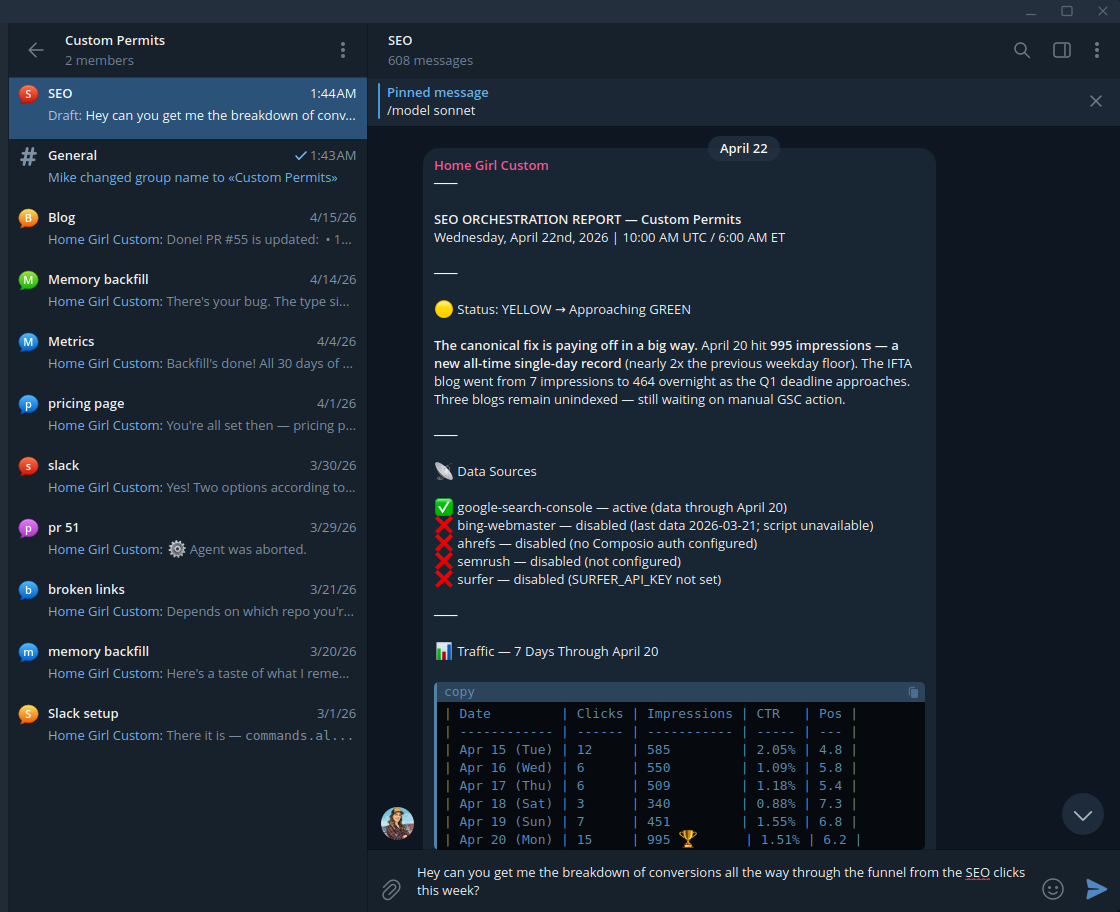
Monday morning. Before you're at the keyboard.
The SEO Teammate's Monday-morning report in a Telegram group. The full loop runs underneath it — three Teammates collaborating, one human approval, shipped conversions by next week.
The loop underneath the report
SEO Teammate
Spots a drop-off in the funnel, drafts a product change.
Engineer Teammate
Writes the fix as a pull request on your repo.
QA Teammate
Reviews, pushes back, sends the Engineer back to the code until it's clean.
You
Review the diff, click approve. Deploy ships.
Next report
Conversion's up. The SEO Teammate kicks off the next loop.
700% Custom Permits' weekly Google impressions, two months in — read the case study.
What every Teammate runs on
The same platform under the engineering lane and every other role.
Dedicated workstation, not an ephemeral container
A Teammate runs on its own dedicated compute. Files stay, databases stay hot, background jobs keep going between conversations.
Model choice per role
Pick from hundreds of models per Teammate: one for engineering, another for sales. When a better model ships, switch the role to it.
Slack, Telegram and Discord
Talk to Teammates where your team already works: Slack, Telegram or Discord, plus webhooks for other systems.
Agent-proposed config changes, human-approved
Teammates can send a pending change through MCP — a new skill, a bigger server, a tweak to their personality file, a different allowed-model set. You get pinged, open the dashboard, and click deploy (or reject). HITL at the config layer, not every task.
The platform is an MCP surface
Platform actions such as creating servers, deploying Teammates, managing skills and rotating secrets are MCP tools as well as dashboard pages. Teammates can run the platform. Or you can.
Model usage at provider list rates
Model usage is billed at published provider list rates.
The memory isn't your model provider's. It's yours.
Every inbound and outbound message your Teammate exchanges becomes training for a memory layer that's inspectable, auditable, and lives on your side of the line — reachable from any AI you already use.
Learns from every message. Every message — inbound or outbound, Slack, Telegram or a webhook — is captured. Important ones get synthesized into long-term memory on their own. You don't have to tell it what to remember.
Synthesizes over time. Conversations roll into session summaries. Sessions roll into daily digests. Days roll into weekly syntheses. Your Teammates know what happened this quarter, not just this conversation.
Shows its work. Every memory pulled into a conversation leaves an audit trace. Open any recall and see why that memory won over the others.
Knows when it's wrong. Change your mind and the old memory gets marked superseded, not overwritten. History is preserved, today's view stays clean.
Reachable from every AI you use. An OAuth-secured MCP server sits in front of your memory. Point any MCP-capable AI client at it — same memory, every AI.
Recall trace
Why was this memory used?
Query
"what's our floor price for snow sisters"
Selected memory
Margin reviewed with Jane on 2026-03-12: floor price for Snow Sisters is $2.10/cup — anything below requires CFO approval.
Ranked on four signals
Beat 19 other candidates. Latency 4 ms.
700% more impressions
in three months.
Custom Permits — a 30-year-old specialty business, previously invisible on Google. We plugged in the SEO Teammate in February.
22,500 impressions. Average position 8.1.
Available to every platform account.
Monthly impressions
Average position
8.1
Keywords ranking
340+
Design your own org chart
An agent server is the workspace where your Teammates live and work. Some people want one to themselves — engineers usually do, so their Product, Engineering, and QA Teammates can collaborate on private code, run real Docker, and keep their repo clones hot. Others share a server across the team — an ops server with a BOS Teammate, an SEO Teammate, and a sales Teammate that everyone can talk to.
Solo operators, small teams, or whole companies. You shape your own org chart.
Engineer's own server
Teammates collaborate on one filesystem. Docker and repo clones stay hot.
Ops team's server
Whole team talks to one set of Teammates over Slack, Telegram or Discord.
Built to not get in your way
No lock-in
Model-agnostic from day one.
Use any of hundreds of models from the major providers, or mix them per role. Switch anytime — your configuration, memory, and track record stay with you. When a better model ships, you're on it the same day.
Real agent servers
Full compute, full filesystem, all yours.
Teammates run on persistent servers — not ephemeral containers. They clone your repos once and keep them hot, run Docker, hold databases, keep background processes alive, and pick up where they left off.
Webhooks that can talk to real machines
Built for machine-to-machine work.
Multiple auth types (bearer, custom header, HMAC), dynamic prompt templates that interpolate payload data, event filtering. The difference between "here's a blob of JSON" and "Review PR #{{payload.number}}: {{payload.title}}."
And everywhere you already work — Slack, Telegram, Discord, or your own webhooks.
Transparent. Right-sized. No surprises.
Pro Solo
One operator, one server, full platform. Model usage billed separately at provider list rates.
- 1 agent server included
- Full platform
- Model usage at provider list rates
- Cancel anytime
Pro Team
Teams of any size. Real workstations, yours alone — as many as you need.
- Seats + compute priced separately
- Model usage at provider list rates
- Add workstations as needed
- Your workstations are yours — never shared with other customers